A Step-by-Step Look at Planning, On-Site Work, and Secure Asset Tracking and Transportation
Whether you’re consolidating facilities, relocating to a colocation environment, upgrading infrastructure, or retiring an aging server room, a successful data center project begins long before the first server is removed from a rack.
Many organizations assume data center decommissioning is simply disconnecting equipment and loading it onto a truck. In reality, the process involves detailed planning, coordinated access, equipment inventories, scheduled downtime, serialized asset tracking, secure transportation, and a documented chain of custody from start to finish.
Understanding what to expect helps your IT team prepare, minimize disruption, and ensure every asset reaches its intended destination securely.
What Happens During a Data Center Decommission?
A typical data center decommission or relocation includes project planning, site access coordination, equipment inventory, scheduled power-down, rack-by-rack equipment removal, serialized asset tracking, secure transportation, and final relocation or IT asset disposition. Every facility is different, but most enterprise projects follow this general sequence.
Phase 1: Project Planning
Every successful data center decommission starts with planning. Before arriving on-site, the project team works with your IT staff, facilities team, and security personnel to understand the environment and build a project plan tailored to the facility.
Planning typically covers site walkthroughs, security and access requirements, loading dock coordination, freight elevator availability, truck staging locations, project schedules, maintenance windows, power-down coordination, safety requirements, and communication plans.
These details matter because a data center is rarely a simple loading environment. Technicians may need advance security clearance, designated elevator access, limited dock windows, or specific staging areas for trucks and equipment. Resolving those requirements before project day prevents delays once systems are offline.
Phase 2: Building the Equipment Inventory
With logistics established, the next step is documenting exactly what will be relocated, remarketed, recycled, or securely destroyed.
The equipment inventory typically accounts for the number and location of server racks, how fully each rack is populated, and the servers, storage arrays, networking equipment, UPS systems, and loose IT assets on-site. Equipment is also categorized by its intended destination, including relocation or IT asset disposition (ITAD).
This inventory allows project managers to estimate labor requirements, transportation needs, packing materials, and overall project duration. For example, a project involving 45 populated racks may require multiple crews over several days, while a smaller server room may be completed within a single day.
Phase 3: Preparing for Project Day
Once planning is complete, the physical work can begin. Before technicians remove equipment, your internal IT team typically shuts down and disconnects production systems during the scheduled maintenance window.
Meanwhile, the decommissioning team stages personnel, pallets, packing materials, tools, and transportation so work can begin as soon as equipment is cleared for removal.
Having the right resources ready before the first rack is touched helps keep the project on schedule and minimizes disruption to adjacent operations.
Phase 4: On-Site Decommissioning
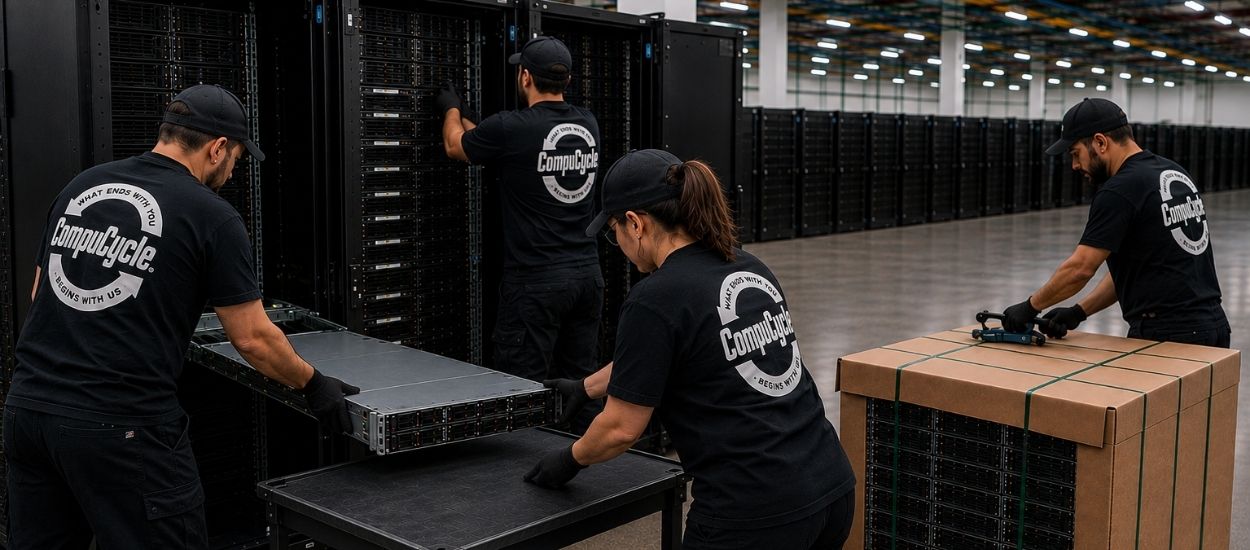
With systems offline, technicians begin systematically removing equipment. Rather than dismantling everything at once, experienced teams work rack by rack according to the project plan.
On-site work typically includes decabling, deracking, removing servers and networking equipment, removing rails and rack accessories, organizing equipment by destination, and preparing assets for transport.
The goal is not simply to empty the room. It is to maintain control over the equipment throughout the process so assets remain organized from their original rack location through final loading.
Phase 5: Serialized Asset Tracking
One of the most important parts of a data center decommission is asset accountability.
As equipment is removed, each serialized asset is scanned and documented. Records may include serial numbers, asset tags, equipment type, original rack location, and intended disposition.
Maintaining this documentation simplifies reconciliation for IT, finance, compliance, and audit teams after the project is complete. It also creates visibility into what left the facility, when it left, and where it is going.
Phase 6: Packing, Loading & Secure Transportation
Once assets have been inventoried, they are prepared for transport. Equipment may be palletized, protected with heavy corrugated cardboard, secured with industrial strapping, and loaded onto staged trucks according to the project plan.
Transportation planning is part of chain-of-custody planning. Coordinated truck staging helps prevent bottlenecks at the loading dock and reduces the amount of time equipment remains in temporary staging areas.
Whether assets are moving to another data center or to a secure processing facility, each handoff should remain documented from pickup through final disposition.
Phase 7: Relocation or IT Asset Disposition
After equipment leaves the facility, the next step depends on the project’s objectives.
Some organizations are relocating infrastructure to another site. Others are retiring equipment permanently. Many projects involve both.
Assets may be relocated for continued use, refurbished, remarketed to recover value, sanitized according to NIST 800-88 guidelines, physically destroyed when required, or responsibly recycled at end of life.
A clear disposition plan established before project day ensures equipment is routed correctly once it leaves the facility.
What Should Your IT Team Have Ready Before a Data Center Decommission?
Before project day, your team should have a finalized equipment list, completed or scheduled production migrations, confirmed power-down windows, reserved loading docks and freight elevators, coordinated security access, identified assets that are staying behind, and designated an internal project point of contact.
The more of these decisions are resolved in advance, the less likely the project is to encounter delays once the maintenance window begins.
Why It Matters Who Performs the Work
One question organizations do not always think to ask is who will actually be performing each part of the decommission.
Every additional subcontractor introduces another handoff in the chain of custody. More handoffs can mean more communication challenges, additional scheduling complexity, and reduced visibility into where assets are at any given time.
CompuCycle performs its data center decommissioning, logistics, transportation, processing, and reporting with in-house teams rather than outsourcing project execution. That creates a single point of accountability from planning through final disposition.
Planning Makes the Difference
The physical removal of servers is only one part of a successful data center decommission or relocation. Careful planning, coordinated logistics, detailed equipment inventories, serialized tracking, secure transportation, and documented chain of custody all work together to reduce risk and keep projects moving on schedule.
Every data center is different, which is why no two projects look exactly alike. The right plan depends on your equipment, facility, security requirements, destination, and timeline.
If you’re preparing for an upcoming relocation or decommission, learn more about CompuCycle’s Data Center Decommissioning Services or contact our team to plan your project.
Schedule Your Data Center Decommission or Relocation with CompuCycle Today!
Frequently Asked Questions
How long does a data center decommission take?
Every project is different. A small server room may be completed in a day, while larger enterprise environments with dozens of populated racks can require several days. Project duration depends on equipment volume, rack density, facility access, security requirements, loading logistics, and the amount of serialized tracking required.
Can equipment be relocated instead of recycled?
Yes. A data center project can include relocation, disposition, or both. Production equipment may be transported to another facility while older assets are routed for refurbishment, resale, data destruction, or responsible recycling.
When is equipment inventoried?
Planning begins with an equipment inventory before the project. Serialized asset records are then updated on-site as equipment is removed and scanned, creating a record of what actually left the facility.
Does the power need to be disconnected before decommissioning?
Yes. Production systems are generally shut down and power is disconnected during an agreed maintenance window before technicians begin removing equipment.
What is the difference between data center decommissioning and data center relocation?
A decommission retires some or all of a facility’s infrastructure, while a relocation moves selected equipment to another operational environment. In practice, many projects combine both: some assets are relocated while others enter the ITAD process.
Can a data center decommission include value recovery?
Yes. Equipment with remaining market value can often be refurbished or remarketed after secure data sanitization. Building value recovery into the disposition plan can help offset project costs while keeping usable equipment in service longer.
Recent Articles
Liquidation vs. Wholesale Buying: Which Is Better for Resellers?
For electronics resellers, the choice between liquidation auctions and traditional wholesale buying comes down to three things: how much control you need over what you buy, how important documentation is to your downstream business, and…
How Online Electronics Liquidation Auctions Work
Online electronics liquidation auctions are a structured bidding process in which bulk lots of refurbished or surplus IT equipment are offered to registered buyers for a set window of time. The highest bid at close…
What R2 Certification Means When Buying Wholesale IT Equipment
R2 certification means an electronics recycler or IT Asset Disposition (ITAD) provider has been independently audited against a published standard covering data security, environmental responsibility, and downstream accountability – from the moment equipment is collected…
Where to Buy Wholesale Refurbished Electronics: A Buyer’s Guide
The fastest way to find wholesale refurbished electronics is to source directly from a certified IT Asset Disposition (ITAD) provider running a wholesale auction – rather than through an uncertified broker or general liquidation marketplace.…
Liquidation vs. Wholesale Buying: Which Is Better for Resellers?

How Online Electronics Liquidation Auctions Work